


Worship Backing Tracks
4.7129.00 Reviews
App Specs
- Version
- 1.1.22
- Updated On
- License
- Free
- Downloads
- 100,000+
- Developer
- XME Inc.
- Categories
- Music & Audio
- Platform
- Android
Screenshots

 Analysis by AppCompare
When I’m planning worship music for a small team, I want the arrangement to feel full without making the preparation harder than the performance. That is the useful promise of Worship Backing Tracks: it is a music and audio app built around backing tracks for worship, giving a leader another way to support a service when the available players or instruments are limited. I’d think of it less as a replacement for musicians and more as an arranging tool that can help a small setup sound more complete.
A starting point for a smaller worship team
The app is published by XME Inc. and sits in the music and audio category. It is free to install, is rated for Everyone, and has a 4.7 average from around 1.3K ratings, with over 100K installs. Those figures suggest it has found a clear audience, though I would still judge it by whether its workflow suits your own team and the way you prepare a service.
That audience is easy to picture: a worship leader covering several roles, a church with a rotating group of musicians, or a singer who needs instrumental support for rehearsal or a smaller gathering. In those situations, a backing arrangement can fill out the sound while leaving the people on stage free to focus on singing, playing, and leading.
The creative benefit is not simply having more sound. It is having a dependable musical foundation to plan around. A leader can consider which parts the live players should take and where a recorded arrangement can carry the rest. That can make a lean group feel intentional rather than under-rehearsed, provided the track is chosen and prepared to fit the song and the people performing it.
Shaping a track to fit the song
The app’s appeal is the prospect of adapting a worship track to the needs of a particular team rather than accepting one fixed arrangement. When choices such as key, tempo, and instrument balance are available for a track, they can make a practical difference: a vocalist may be more comfortable in a different key, a song may need a calmer pace, or a live guitarist may need room in the mix.
My practical advice is to make those decisions during rehearsal, not while the congregation is waiting. Try the arrangement with the actual singers and players, then settle on a version that feels natural. Changing several musical choices at once can make it harder to tell what helped, so I would adjust one element, listen again, and keep a note of the setup that works for the team.
There is also a trade-off in relying on a prepared arrangement. It can create a polished, consistent foundation, but it may not respond as naturally as a live musician to a spontaneous repeat, a longer pause, or a change in energy. I would use the track to support the musical plan, not assume it will follow every unplanned moment. A leader who values open-ended improvisation may prefer a live accompanist or a simpler arrangement.
Worth Reading Before You Choose

Flipboard Shows What News Apps Must Do Beyond the Feed

Switching to Android Auto Means Rethinking Your Driving Routine

Google Calendar Makes a Crowded Week Easier to Manage

Ludo King Makes the Most of the Minutes Between Plans

Baby Panda World Brings Quick Play to Modern Phones, but Its Game Library Feels Busy

ESPN’s Live Game View Makes Following Close Games Easier
Planning the set before the service
A set list is most useful when it reflects the flow of the whole gathering, not just a collection of songs. I would choose the order first, then rehearse transitions and decide who is responsible for starting each track. That small bit of preparation reduces uncertainty on stage and helps the group move between songs with purpose.
For example, imagine a Sunday when the usual drummer cannot attend and the remaining group consists of a singer, a keyboard player, and a guitarist. During rehearsal, the leader can test which songs benefit from a backing arrangement, choose a comfortable musical direction, and agree on clear cues for starting and ending each selection. The app can help provide the missing musical layer, while the team remains responsible for leading the room.
Offline access is valuable in that scenario because a venue’s connection may be unreliable. I would prepare any tracks needed for the service while connected, then check that the intended songs are ready before leaving for the venue. This is a simple precaution, but it matters: the time to discover a missing download or an unfamiliar control is rehearsal, not the first song of the service.
Compared with using a general music player, a dedicated worship-track app is appealing when the goal is to build a service around instrumental backing rather than simply play songs for listening. A general player may be easier for casual playback, but it usually does not center the same kind of worship-team preparation. On the other hand, if your team already has a musician for every part and prefers to shape each arrangement live, a collection of backing tracks may add less value than rehearsal time together.
Onstage workflow and handoff
For live use, the most important question is whether the person operating the app can do so without losing focus on leading. I would assign that responsibility before the service, keep the set in its planned order, and agree on a simple cue between the leader and whoever starts playback. A phone or tablet can be convenient, but it should be placed where the operator can reach it without interrupting the performance.
It is also worth rehearsing what happens at the end of a track. The group should know whether the next song begins immediately, follows a spoken transition, or needs a brief pause. Even when a tool supports smooth movement between selections, a musical handoff still depends on the people using it. Practicing that moment helps prevent a technically tidy transition from feeling emotionally rushed.
I would also avoid making last-minute mix changes during a service unless there is a clear need. A balance that sounds right through headphones may feel different in a room, and hurried adjustments can distract the leader. Test the arrangement in the space when possible, agree on a comfortable level, and leave the person at the controls with a straightforward job.
Questions worth settling before relying on it
One question many teams have is whether an app like this can work for a one-person setup. It can be a useful option for a solo worship leader who wants instrumental support, as well as for a group with only a few live players. The deciding factor is whether the available arrangements suit the songs and whether the leader is comfortable coordinating playback alongside singing or playing.
Another practical question is whether it can be used without internet during a service. The app’s offline-access option is intended to help with that, but I would still prepare ahead and verify the needed material on the device before the event. Treating offline playback as a rehearsal task rather than an assumption is the safer workflow.
People may also wonder whether they can tailor the sound to their group. The app is presented as offering track customization, including musical adjustments such as key, tempo, and instrument levels. I would explore those choices before settling on a song, because a track that is close to the right fit may become much more usable after careful adjustment. The available controls can vary by the material being used, so I would check the specific track rather than assume every selection offers identical options.
Finally, the price deserves a little attention. The app is free to install, while in-app purchases range from $9.99 to $399.99 per item. That is a broad range, so I would look closely at what a purchase includes and whether it matches the team’s needs before spending. A free install gives you a way to assess the experience, but it does not mean every useful track or resource will necessarily be included at no cost.
Where it fits, and where it does not
This is best suited to worship leaders who want a prepared musical foundation and are willing to plan around it. It can be particularly helpful for a small church, a rehearsal with an incomplete lineup, or a service where a musician is unavailable. It may also help a team keep its arrangements consistent when different people lead on different weeks.
I would be more cautious if your group depends on spontaneous changes, extended instrumental sections, or close interaction between a live band and the congregation. A fixed backing arrangement can make those moments less flexible. In that case, a live player, a simpler accompaniment, or an arrangement built entirely by the team may serve the music better.
The app runs on Android with a minimum operating system requirement of version 6.0, and its current version is 1.1.19. It was released on September 26, 2018. Those details matter most when checking whether an older device is suitable; I would also test the device your team plans to use before building a service workflow around it.
First Impressions and Setup
From the get-go, Worship Backing Tracks is all about ease of use. The app's interface is clean and intuitive, which means you don't have to be a tech wizard to get started. Downloading and setting up the app is a breeze. Once you're in, you're greeted with a library that feels like a treasure trove of worship music.
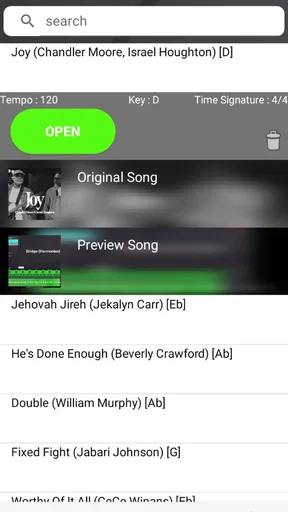
One thing I love about this app is how quickly you can find what you're looking for. Whether you're after a specific song or just browsing for inspiration, the search and filter functions make this super easy. And trust me, there’s a lot to explore!
Features That Stand Out
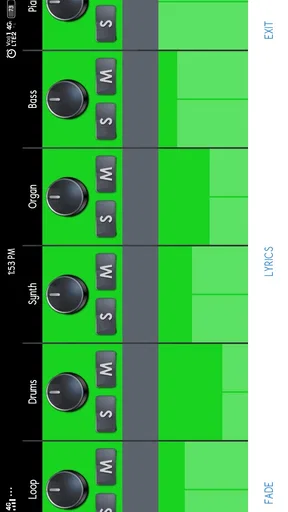
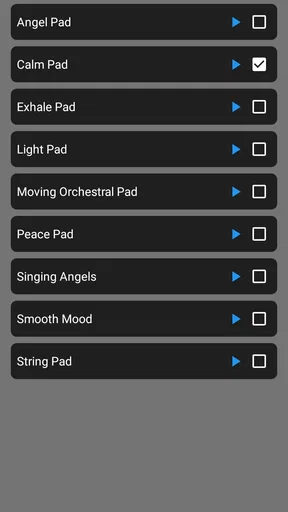
Customization is King: One of the best features is the ability to customize tracks. You can adjust the volume of different instruments, change the key, and even set the tempo. This flexibility is perfect if you want to match the track to your unique style or the capabilities of your band.
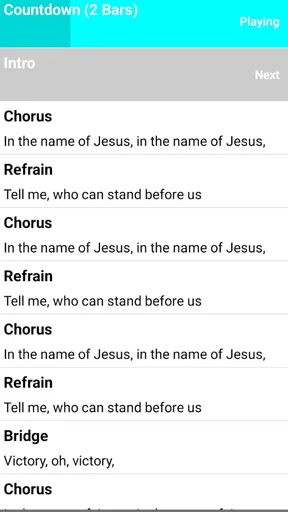
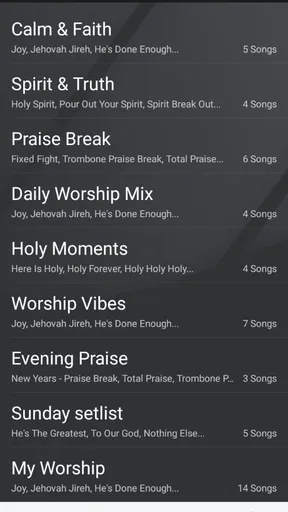
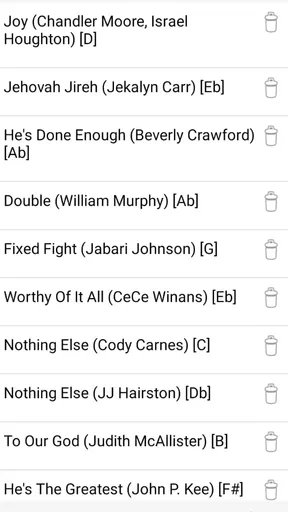
Set Lists and Seamless Transitions: Creating a set list is as simple as dragging and dropping your selected tracks. The app allows for seamless transitions between songs, ensuring that your worship session flows smoothly from start to finish.
Offline Access: Got a spotty internet connection at your venue? No worries. You can download tracks for offline use, meaning you’re never left hanging during a live performance.
The User Experience
Using the app during a live session is straightforward. The interface is designed to be distraction-free, focusing on your performance and not on fiddling with settings. Plus, the sound quality is top-notch, which is crucial when it comes to delivering a powerful and immersive worship experience.
The app supports a wide range of devices, so whether you're working from a phone or a tablet, it has you covered. The developers have clearly put a lot of thought into making sure the app is user-friendly, without sacrificing any of the robust features that worship leaders need.
Community and Support
An aspect of the app that really shines is the sense of community. There’s an in-app support feature where you can reach out for help or even suggest new songs to be added to the library. The team behind the app is very responsive, and it feels like they genuinely care about improving the user experience.
There’s also a blog and a set of tutorials available, which are great resources for both newbies and seasoned pros. Whether you need tips on setting up your first set list or want to learn more about advanced features, there’s something for everyone.
The Verdict
All in all, Worship Backing Tracks is a game-changer for worship leaders. It’s packed with features that make planning and performing worship music a breeze, all while maintaining a high level of customization and quality. The app is reliable, easy to use, and backed by a supportive community, making it an invaluable tool for anyone involved in worship music.
If you’re looking for a way to enhance your worship sessions and bring a new level of professionalism to your music, give this app a shot. It might just become your new best friend on stage!
Pros
- Extensive library of worship songs.
- Customizable track arrangements.
- User-friendly interface.
- Offline mode for on-the-go access.
- Regular updates with new songs.
Cons
- Limited free trial options.
- Requires subscription for full features.
- Occasional app crashes reported.
- Not all songs have multi-tracks.
- Some users find the interface outdated.
FAQs for Worship Backing Tracks
What is Worship Backing Tracks and how does it enhance my music experience?
Worship Backing Tracks is an app designed for musicians and worship leaders, offering a wide selection of professionally produced backing tracks for worship songs. It enhances your music experience by providing high-quality, customizable tracks that can be adjusted to suit different worship settings, ensuring a seamless performance.
Can I customize the tracks to fit my worship service needs?
Yes, Worship Backing Tracks allows users to customize tracks by adjusting the tempo, key, and individual instrument levels. This flexibility ensures that you can tailor each track to fit the specific needs of your worship service, making it versatile for various musical arrangements.
Is Worship Backing Tracks available for both Android and iOS devices?
Worship Backing Tracks is available for both Android and iOS platforms, ensuring compatibility with a wide range of devices. This cross-platform availability allows users to access their tracks and playlists on different devices, providing convenience and flexibility for worship teams.
Does the app require an internet connection to use the tracks?
While Worship Backing Tracks offers the ability to download tracks for offline use, an initial internet connection is required to browse and download tracks. Once downloaded, the tracks can be accessed without an internet connection, making it ideal for venues with limited connectivity.
Are there subscription options and what features do they include?
Worship Backing Tracks offers various subscription options, typically including access to a vast library of songs, track customization features, and regular updates with new content. Subscriptions may vary in price and features, so it’s advisable to review the available plans to choose one that best fits your needs.


